Medical ID · an overview of the options
Types of medical ID: how the options compare
A medical ID helps the people around someone understand what is wrong, who to call and how to help, when that person can’t explain it. There are several ways to carry this information, each with its own strengths and limits. This guide compares them so you can choose what fits you or the person you care for, or combine a few.
Make a free medical ID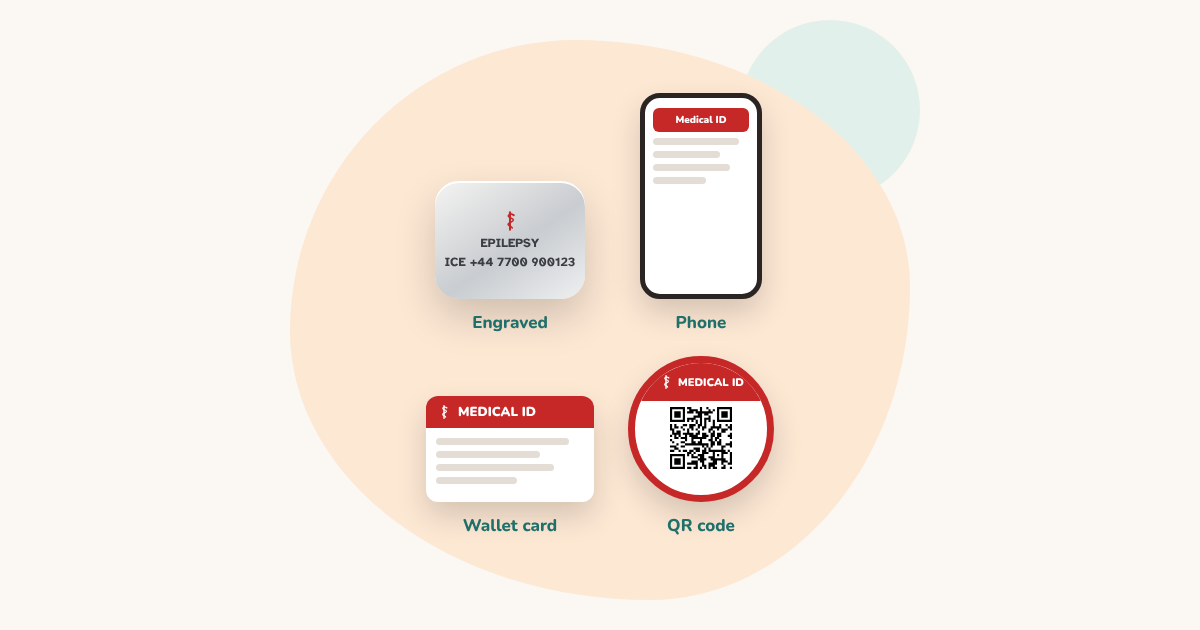
Engraved bracelets and tags
The classic medical ID: a few words engraved on a bracelet, a necklace or a tag, usually the condition and a phone number.
- Good: nothing to charge, scan or unlock. It can be read at a glance, anywhere.
- Good: a familiar format that people recognise.
- Limit: room for only a few short lines.
- Limit: changing the text means a new engraving.
- Limit: no room for first-aid steps or several contacts.
Best for: the one thing a stranger must know first, with no technology involved.
Wallet cards
A printed card kept in a wallet or bag, next to an identity card or bank cards.
- Good: free or cheap, with room for more detail than an engraving.
- Good: easy to reprint when something changes.
- Limit: helpers have to think of looking in a wallet, and it isn’t always carried.
- Limit: paper wears out. A plastic sleeve or lamination helps.
Best for: extra detail alongside a bracelet, for people who always carry a wallet.
Medical ID on the phone
iPhone and Android phones can show medical information and emergency contacts from the lock screen, without unlocking the phone.
- Good: free, already on most phones, and easy to update.
- Good: room for medicines, allergies and several contacts.
- Limit: the phone has to be there, charged and working.
- Limit: helpers need to know where to look on a locked phone.
- Limit: it lists information, but doesn’t usually explain what to do.
Best for: people who always carry their phone, as extra detail.
QR codes linked to an online profile
Some services put a QR code or a link on a bracelet or tag. Scanning it opens a profile stored online.
- Good: room for a lot of information, readable in any phone browser.
- Good: the profile can often be updated without changing the tag.
- Check: many services use an account and store the profile on the provider’s servers.
- Check: some features, or continued access, may need a subscription.
- Check: the helper’s phone needs internet to open the profile.
Best for: people who want a large profile they can update online, and are comfortable with a service storing it.
DigitalBracelet: a QR code with nothing stored online
DigitalBracelet is also a QR code, but it works differently: the information is written into the link inside the code itself, after the “#”. Browsers never send that part to a server, so there is no profile stored online and nothing to sign up for.
- Free, with no account and no subscription.
- Shows the person helping what to do for the conditions you choose, with one-tap buttons to call your contacts, or to send them a message from the helper’s own phone.
- The card appears in the helper’s language: English, Spanish or French.
- Works on what you already have: a bracelet, tag, card, sticker or keyring.
- Limit: the full card needs internet on the helper’s phone. An optional backup code shows the essentials as text, offline.
- Limit: it can’t be edited remotely. When something changes, you make a new code and replace the old one.
- Limit: someone still has to notice the code and scan it.
Best for: more detail than an engraving, practical steps for the helper, and nothing stored online.
Stickers and NFC tags
The same information can travel on other things.
- Medical ID stickers: on a school bag, a wheelchair, a bike or a phone case, with clear words such as MEDICAL ID and, if you like, a QR code.
- NFC tags: a small chip that a phone reads with a tap. It can hold a link, as a QR code does. Most recent phones can read it, but helpers may not think to try: add a label such as “Tap or scan”.
Side by side
| Engraved | Wallet card | Phone | Online QR profile | DigitalBracelet | |
|---|---|---|---|---|---|
| Needs the wearer’s phone | No | No | Yes | No | No |
| Needs a phone to read it | No | No | It is the phone | Yes, any phone | Yes, any phone |
| Needs internet to read it | No | No | No | Usually | Full card: yes. Backup code: no |
| Room for detail | A few lines | Some | A lot | A lot | A lot |
| Tells the helper what to do | Rarely | If you write it | Rarely | Varies | Yes, for the conditions you choose |
| Updating | New engraving | Reprint | Edit on the phone | Often online | New code |
| Account needed | No | No | No | Often | No |
| Where the information is kept | On the item | On the card | On the phone | Usually on the provider’s servers | Only in the code |
| Cost | The item | Free to print | Free | Varies | Free |
Which one should you choose?
- If one thing matters most, such as a condition and a phone number, an engraved bracelet shows it at a glance.
- If you always carry your phone, fill in its medical ID: it’s free and takes a few minutes.
- If you want helpers to know what to do, or you’d rather nothing is stored online, a free QR code from DigitalBracelet adds that.
- If you want a large profile you update online and don’t mind an account, an online QR service may suit you.
You can combine them
Many people use more than one. A common combination: an engraved bracelet with the condition, a phone number and “SCAN FOR MORE”, a QR code on a tag or sticker next to it, the phone’s medical ID filled in, and a wallet card. Each one can be found in a moment when another might not be.
And medical alert systems?
A medical alert, or personal alarm, is something else: it calls for help when a button is pressed. It doesn’t tell the person who arrives what is wrong. Many families use an alarm and a medical ID together.
Questions
What is the best type of medical ID?
There isn’t one best type. An engraved bracelet works with no technology, the phone’s medical ID is free and detailed, and a QR code can tell helpers what to do. Many people combine two or three.
Do I need a medical ID bracelet if my phone has one?
Having both helps. The phone has to be there, charged and found. A bracelet, tag or card works even when the phone isn’t.
Is a QR code medical ID private?
It depends on the service. Some keep your profile on their servers. DigitalBracelet keeps nothing: the information is inside the code itself. Either way, anyone who scans a code can read it, so include only what a helper needs.
Can a medical ID call for help?
No. A medical ID gives information. To call for help with a button, you need a medical alert system.
What should a medical ID say?
The condition a stranger must know first, a phone number to call, and anything that changes how to help, such as blood thinners or a severe allergy.

Create your free emergency ID. Takes 3 minutes. No account. Free forever.
Make a free medical IDRelated pages
More practical guides
Sources
Published 24 October 2026